Skip to content

Unlock the potential of your innovation project with our help guides and videos. Let’s get started.

Running your Project

7
  • How to propose a Project
  • How to add users to a Project
  • How to choose & edit Project KPIs
  • How to view & track Project progress
  • How to end a Project
  • How to view Project KPIs

Working with Fintechs

4
  • How to request a Fintech not available on NayaOne
  • Fintechs overview
  • Due diligence with Fintechs
  • How to test & compare multiple Fintechs

Using Data

3
  • How to add a Dataset
  • How to make requests to Datasets
  • Datasets overview

Managing Users

2
  • How to add Business Units
  • User roles

Configuring your Sandpits

1
  • Cloud Sandpit Budget Limits and Notifications

Use Case Library

3
  • Machine Learning with AWS SageMaker
  • Exploring AI with NayaOne
  • Wealth management property valuations

Working in Sandpits

7
  • Cloud Sandpit Budget Limits and Notifications
  • How to change Sandpit access settings
  • How to remove a Fintech from a Sandpit
  • How to add third-party collaborators to a Sandpit
  • Data Science Sandpit: Overview
  • Cloud Sandpit: Overview
  • SaaS Sandpit: Overview
  • Main website
  • Help Centre
  • I'm running a project
  • How to add a Dataset
View Categories

How to add a Dataset

You can add Datasets when creating a Project, and when a Project is running.

How to add a Dataset before a Project starts #

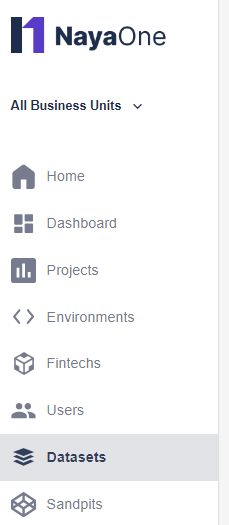
  1. Click Datasets:
    Sidebar with Datasets selected
  2. You can view the Datasets, each with a short summary and tagged with the use cases
  3. Click a Dataset to explore more details
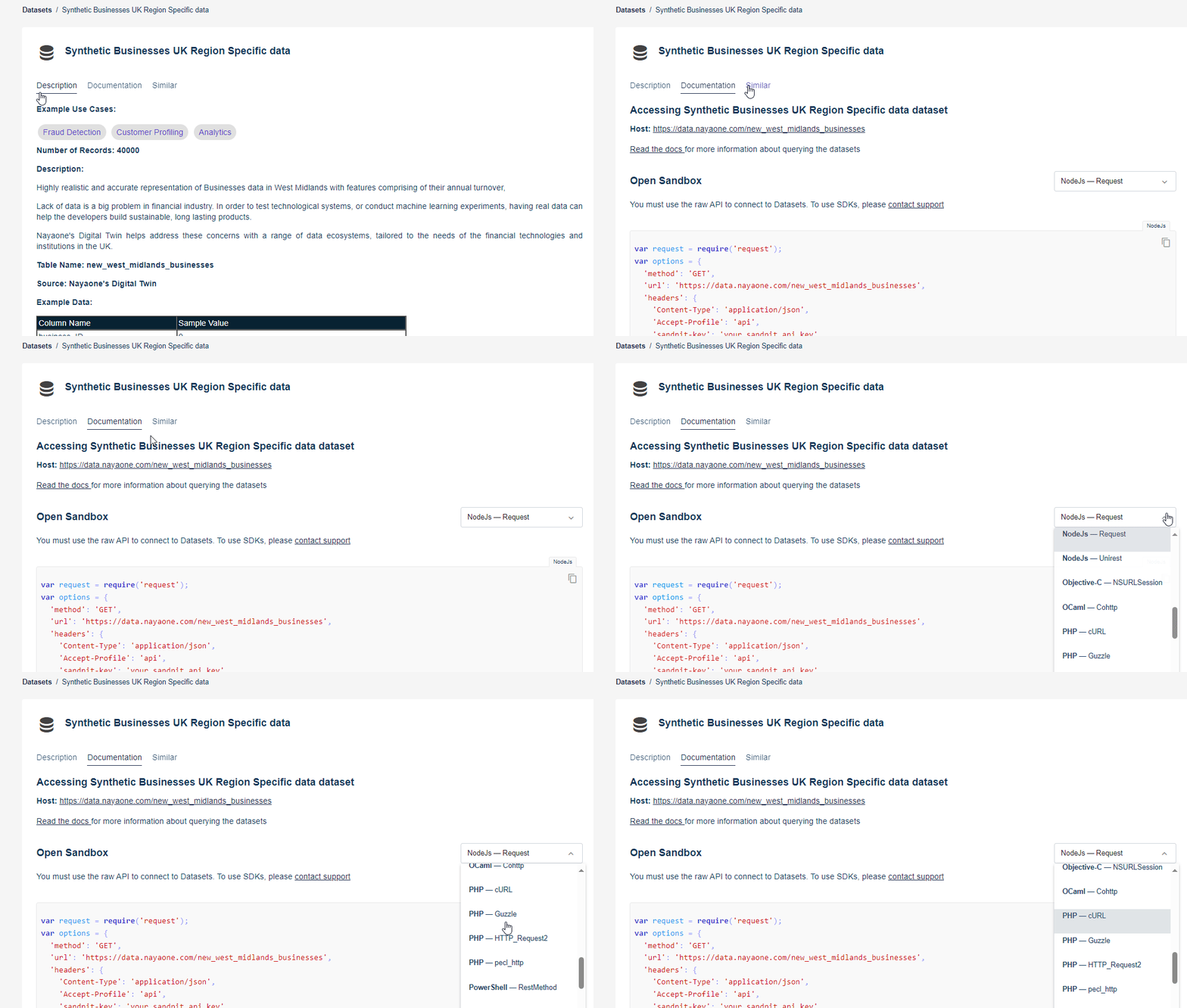
  4. Click a tab to read the description, view documentation, and find similar Datasets:
    Tabs showing Dataset documentation
  5. When you’ve made your choice, you can propose a project

How to add a Dataset when a Project is running #

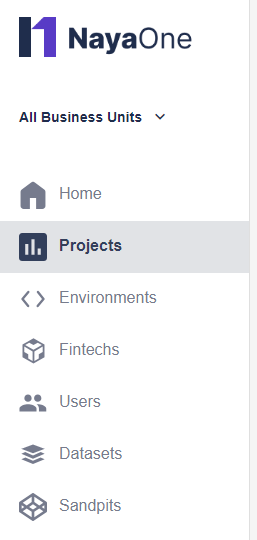
  1. Click Projects and click the Project where you want to add a Dataset:
    Projects highlighted in sidebar
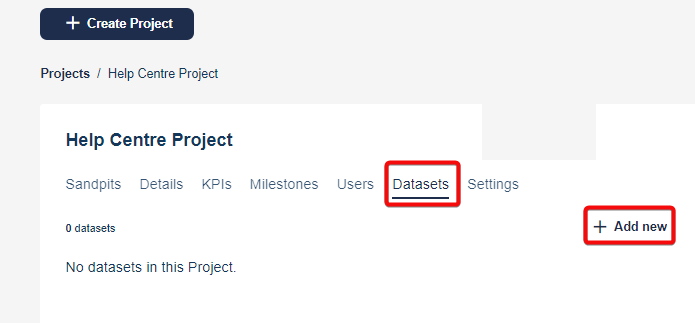
  2. Click the Datasets tab > +Add new:
    Add new button
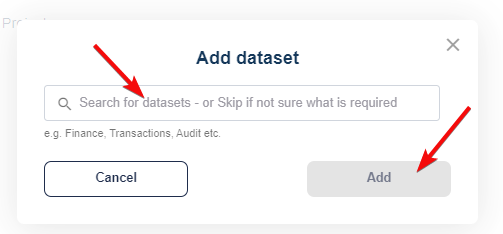
  3. Search for the Dataset and click Add:
    Search bar and add link
  4. Your selected Dataset now appears under the Datasets tab
Did this page answer your question?
This article covers:
  • How to add a Dataset before a Project starts
  • How to add a Dataset when a Project is running
NayaOne company logo

© 2019–2025 NayaOne. All rights reserved

NayaOne company logo
Manage Consent
To provide the best experiences, we use technologies like cookies to store and/or access device information. Consenting to these technologies will allow us to process data such as browsing behaviour or unique IDs on this site. Not consenting or withdrawing consent, may adversely affect certain features and functions.
Functional Always active
The technical storage or access is strictly necessary for the legitimate purpose of enabling the use of a specific service explicitly requested by the subscriber or user, or for the sole purpose of carrying out the transmission of a communication over an electronic communications network.
Preferences
The technical storage or access is necessary for the legitimate purpose of storing preferences that are not requested by the subscriber or user.
Statistics
The technical storage or access that is used exclusively for statistical purposes. The technical storage or access that is used exclusively for anonymous statistical purposes. Without a subpoena, voluntary compliance on the part of your Internet Service Provider, or additional records from a third party, information stored or retrieved for this purpose alone cannot usually be used to identify you.
Marketing
The technical storage or access is required to create user profiles to send advertising, or to track the user on a website or across several websites for similar marketing purposes.
  • Manage options
  • Manage services
  • Manage {vendor_count} vendors
  • Read more about these purposes
View preferences
  • {title}
  • {title}
  • {title}
NayaOne company logo
Manage Consent
To provide the best experiences, we use technologies like cookies to store and/or access device information. Consenting to these technologies will allow us to process data such as browsing behaviour or unique IDs on this site. Not consenting or withdrawing consent, may adversely affect certain features and functions.
Functional Always active
The technical storage or access is strictly necessary for the legitimate purpose of enabling the use of a specific service explicitly requested by the subscriber or user, or for the sole purpose of carrying out the transmission of a communication over an electronic communications network.
Preferences
The technical storage or access is necessary for the legitimate purpose of storing preferences that are not requested by the subscriber or user.
Statistics
The technical storage or access that is used exclusively for statistical purposes. The technical storage or access that is used exclusively for anonymous statistical purposes. Without a subpoena, voluntary compliance on the part of your Internet Service Provider, or additional records from a third party, information stored or retrieved for this purpose alone cannot usually be used to identify you.
Marketing
The technical storage or access is required to create user profiles to send advertising, or to track the user on a website or across several websites for similar marketing purposes.
  • Manage options
  • Manage services
  • Manage {vendor_count} vendors
  • Read more about these purposes
View preferences
  • {title}
  • {title}
  • {title}