Skip to content

Unlock the potential of your innovation project with our help guides and videos. Let’s get started.

TechSprint Participants

7
  • How to participate in an Event?
  • How to join a challenge?
  • How to join a project team?
  • How to get an API key?
  • How to make a request to Tech Provider?
  • How to connect and query Datasets?
  • How to submit results?

TechSprint Admins

5
  • How to create an Event?
  • How to create a Challenge?
  • How to create a Project?
  • How to create a Sandpit?
  • Main website
  • Help Centre
  • TechSprints
  • How to create a Challenge?
View Categories

How to create a Challenge?

When the event is created, the admins are able to create a challenge for team collaboration.

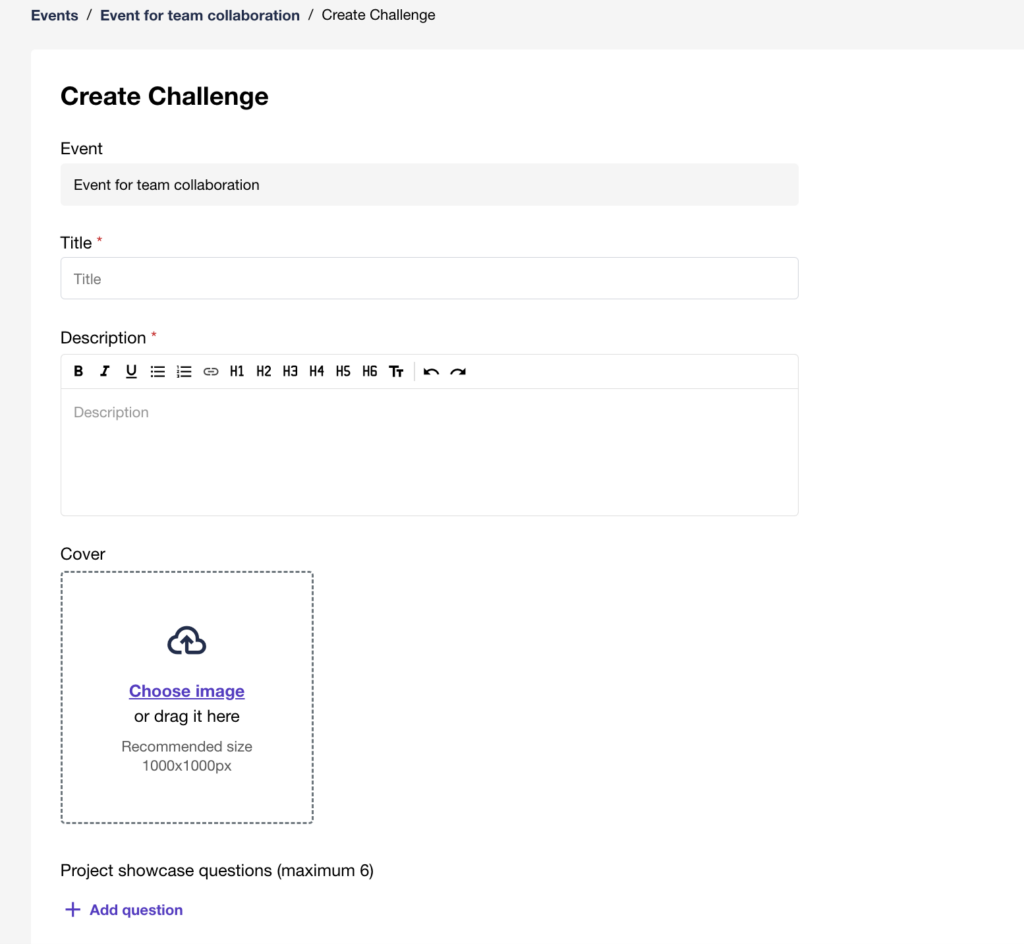
To create a challenge, open your event on the “Challenge” tab and click on the “Add challenge” button

Fill in the title and description in the fields for your new challenge. Set the cover image if you want to use it in your challenge.
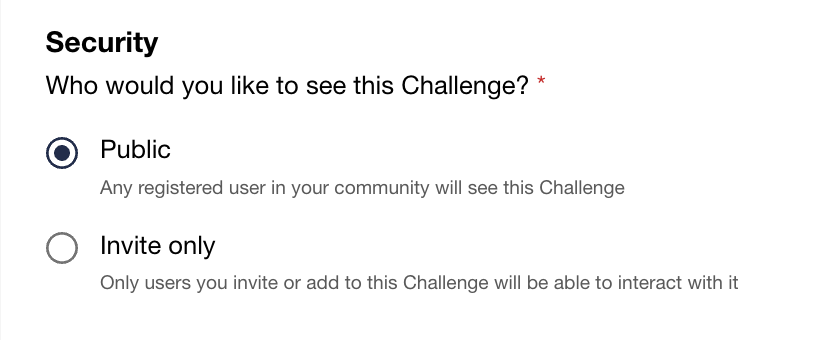
Choose required Security setting for your challenge:

  • Public – make it visible for all users
  • Invite only – only invited users will be able to view the challenge
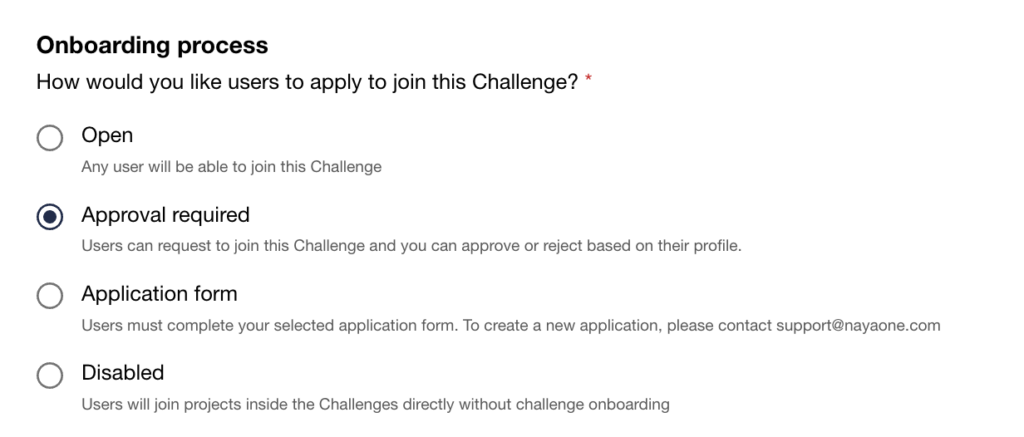
Choose the onboarding type for users. Depending on the settings, the following options will be available for users’ onboarding:

  • Open – any user can join the challenge
  • Approval required – the user can apply, and the admin will decide to approve them or reject from accessing to the project
  • Application form – you can set up the application form with questions. To apply, the user must complete the application form. After that, the admin will decide to approve them or reject from accessing to the project
  • Disabled – the onboarding is opene,d and the user can simply join without applying
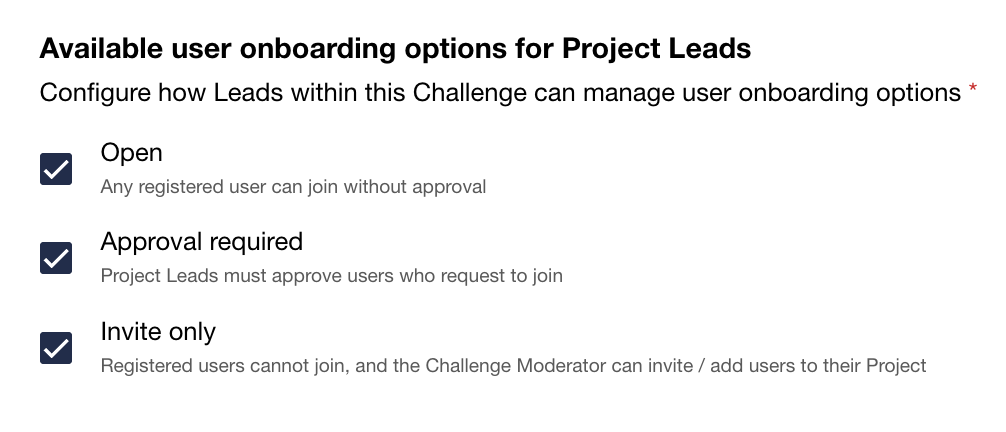
Choose the user onboarding type for Project Leads. Depending on the settings, the following options will be available for users onboarding that is managed by Project Leads:

  • Open – Any registered user can join without approval
  • Approval required – The Project Leads must approve the applied users
  • Invite only – the users can join the Project only via invitation
After all required settings are chosen, click on the “Create Challenge” button to make your challenge live.

Did this page answer your question?
NayaOne company logo

© 2019–2025 NayaOne. All rights reserved

NayaOne company logo
Manage Consent
To provide the best experiences, we use technologies like cookies to store and/or access device information. Consenting to these technologies will allow us to process data such as browsing behaviour or unique IDs on this site. Not consenting or withdrawing consent, may adversely affect certain features and functions.
Functional Always active
The technical storage or access is strictly necessary for the legitimate purpose of enabling the use of a specific service explicitly requested by the subscriber or user, or for the sole purpose of carrying out the transmission of a communication over an electronic communications network.
Preferences
The technical storage or access is necessary for the legitimate purpose of storing preferences that are not requested by the subscriber or user.
Statistics
The technical storage or access that is used exclusively for statistical purposes. The technical storage or access that is used exclusively for anonymous statistical purposes. Without a subpoena, voluntary compliance on the part of your Internet Service Provider, or additional records from a third party, information stored or retrieved for this purpose alone cannot usually be used to identify you.
Marketing
The technical storage or access is required to create user profiles to send advertising, or to track the user on a website or across several websites for similar marketing purposes.
  • Manage options
  • Manage services
  • Manage {vendor_count} vendors
  • Read more about these purposes
View preferences
  • {title}
  • {title}
  • {title}
NayaOne company logo
Manage Consent
To provide the best experiences, we use technologies like cookies to store and/or access device information. Consenting to these technologies will allow us to process data such as browsing behaviour or unique IDs on this site. Not consenting or withdrawing consent, may adversely affect certain features and functions.
Functional Always active
The technical storage or access is strictly necessary for the legitimate purpose of enabling the use of a specific service explicitly requested by the subscriber or user, or for the sole purpose of carrying out the transmission of a communication over an electronic communications network.
Preferences
The technical storage or access is necessary for the legitimate purpose of storing preferences that are not requested by the subscriber or user.
Statistics
The technical storage or access that is used exclusively for statistical purposes. The technical storage or access that is used exclusively for anonymous statistical purposes. Without a subpoena, voluntary compliance on the part of your Internet Service Provider, or additional records from a third party, information stored or retrieved for this purpose alone cannot usually be used to identify you.
Marketing
The technical storage or access is required to create user profiles to send advertising, or to track the user on a website or across several websites for similar marketing purposes.
  • Manage options
  • Manage services
  • Manage {vendor_count} vendors
  • Read more about these purposes
View preferences
  • {title}
  • {title}
  • {title}